Appearance
Search Tool
Overview
The Search Tool is a comprehensive spatial discovery system that provides intelligent location services and rapid visualization of geographic features through multiple integrated data sources and formats. This powerful tool combines ArcGIS search components with custom search services to deliver seamless access to STT databases, external cadastral systems, coordinate-based navigation, and specialized forestry datasets, enabling users to quickly locate and navigate to specific areas, features, or coordinates with precision and efficiency.
Search Options
STT Database Sources
- Provcoupe
- Block code
- Property Right
- Asset
- Operation
- Road Name
- Road and Place Name
- Road
- Fire Towers
- Compartment
External Sources
- Cadastre Parcels (The NRE)
- what3words
Coordinate Formats
- Coordinates
- Latitude and longitude
- Decimal degrees
- Degrees Minutes Seconds
Data Sources
| Search Type | Data Source | URL | Search Field |
|---|---|---|---|
| Provcoupe | STT | Link | PROVCOUPE |
| Block | STT | Link | BLOCK_CODE |
| Compartment | STT | Link | COMPARTMENT |
| Asset | STT | Link | ASSET_ID |
| Operation | STT | Link | OPERATION_ID |
| PR ID | STT | Link | PR_ID |
| Property Right | STT | Link | PROPERTY_RIGHT_ID,TITLE_ID,PROPERTY_ID |
| Road | STT | Link | RDNAME |
| Fire Towers | STT | Link | ASSET_NAME |
| Address | STT | Link | Name |
| PID | LIST | Link | PID,FOLIO,VOLUME |
| what3words | what3words | Link | XXX.XXX.XXX |
Using the Tool
Basic Search
Select data type:
- Default is 'All'
- Choose specific type for targeted search
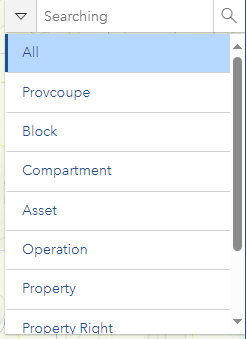
Enter search value:
- Type in search term
- Wait for suggestions

Specific Search Methods
what3words Search
- Enter location in XXX.XXX.XXX format
- Press Enter or click magnifier
Coordinate Search
- Enter coordinates in the search bar
- Use appropriate format (EPSG:28355 easting/northing or WGS84 latitude/longitude)
WARNING
Coordinate searches are validated against Tasmania bounds. EPSG:28355 coordinates must be within X: 190,000–640,000 and Y: 5,120,000–5,630,000. Coordinates outside this range will not return results.
Latitude/Longitude Search
- Use DD format in CoordinateConversion tool
- Execute search
Troubleshooting
| Issue | Solution |
|---|---|
| No results | Check input format and broaden search |
| Coordinate errors | Verify coordinate system format |
| External source issues | Check network connection |