Appearance
Architecture
Table of Contents
System Architecture Diagram
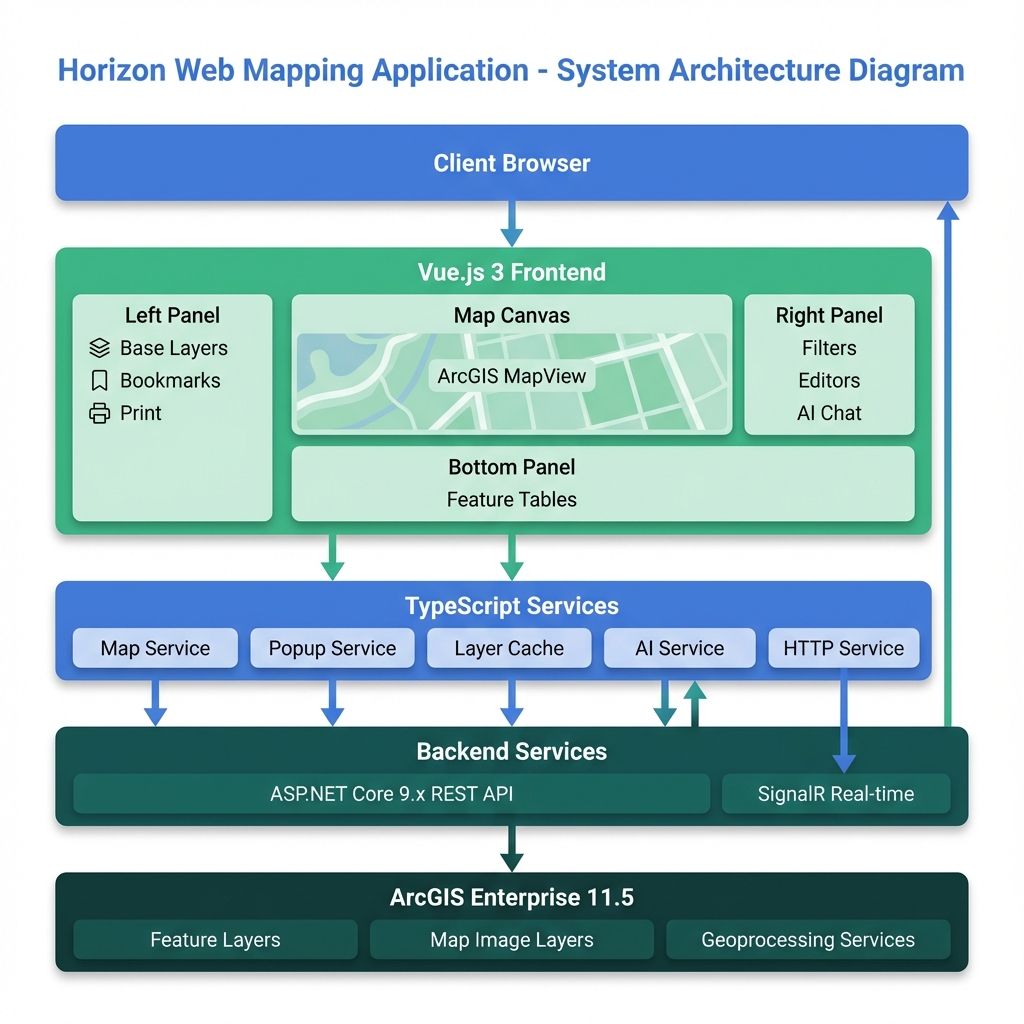
The diagram above shows the complete system architecture of Horizon:
- Client Layer: Web browser accessing the application
- Frontend Application: Vue.js 3 with TypeScript services and state management
- Backend Services: ASP.NET Core 9.x REST API with SignalR real-time updates
- GIS Platform: ArcGIS Portal and Enterprise 11.5
- Data Layer: Feature Layers, Map Image Layers, and WMS services
Data Flow
mermaid
sequenceDiagram
    participant User
    participant UI as Vue Component
    participant Service as TypeScript Service
    participant Cache as Layer Cache
    participant API as ArcGIS API
    participant Server as Enterprise Server

    User->>UI: Interact with Map
    UI->>Service: Request Data
    Service->>Cache: Check Cache

    alt Cache Hit
        Cache-->>Service: Return Cached Data
    else Cache Miss
        Service->>API: Query Layer
        API->>Server: Fetch Data
        Server-->>API: Return Features
        API-->>Service: Process Results
        Service->>Cache: Store in Cache
    end

    Service-->>UI: Update View
    UI-->>User: Display Results
Overview
Horizon is a Vue.js 3 + TypeScript web mapping application built with ArcGIS API for JavaScript.
Built for: Forestry and mapping professionals Focus: Fast performance, modular design, reliable operation
Key Principles
| Principle | What it means |
|---|---|
| Performance at Scale | Smart caching, batch loading, lazy initialization |
| Modular Design | Plugin-based editors, clear separation |
| Reliable Operation | Error handling, graceful degradation |
Quick Reference
What Makes Horizon Fast?
- Lazy Loading: Only loads what you need, when you need it
- Smart Caching: Remembers layers to avoid repeated lookups
- Batch Processing: Loads large bookmarks in chunks, not all at once
- Auto Cleanup: Removes unused resources automatically
Key Components
| Component | Purpose |
|---|---|
| 36 Vue Components | UI panels and tools |
| 11 TypeScript Services | Backend logic and data handling |
| Layer Cache System | Fast layer access and filtering |
| Panel Manager | Coordinates 40+ panels |
| Event Bus | Component communication |
Application Structure
Panel Layout
┌─────────────────────────────────────────────────────────────┐
│                     HORIZON APPLICATION                     │
├─────────────────────────────────────────────────────────────┤
│                                                             │
│  LEFT PANEL          CENTER MAP           RIGHT PANEL       │
│  (Primary)          (Main View)          (Contextual)       │
│                                                             │
│  • Base Layers      ┌───────────┐        • Filter Panel    │
│  • Add Layers       │   Map     │        • Area Summary    │
│  • Layers           │  Canvas   │        • Map Editors     │
│  • Bookmarks        │           │        • Analysis Tools  │
│  • My Layers        │ Graphics  │        • Style Tool      │
│  • Print            │           │        • Measure         │
│  • System Panel     │  Search   │        • Feature Table   │
│  • Help             └───────────┘        • AI Chat         │
│  • Plot Generator                                           │
│                                                             │
│  ─────────────────────────────────────────────────────────  │
│                                                             │
│  BOTTOM PANEL (Collapsible)                                │
│  • Production Summary Table                                 │
│  • Feature Tables                                           │
│  • Analysis Results                                         │
│                                                             │
└─────────────────────────────────────────────────────────────┘
Panel Organization
Left Side (Always Available)
- Core features and navigation
- Configuration tools
- System management
Right Side (Context-Specific)
- Analysis tools
- Map editors
- Advanced functions
Bottom (Data Display)
- Tables and results
- Reports
- Feature data
Top (Floating)
- Quick controls
- Scale selector
- View options
Technical Stack
Frontend Framework
Vue.js 3 with Composition API
- Modern reactive system
- Reusable composables
- Optimal performance
TypeScript
- Type safety throughout
- Prevents runtime errors
- Better IDE support
Mapping Platform
ArcGIS JavaScript API
- 2D mapping (MapView)
- Multiple layer types
- Spatial analysis tools
- Enterprise integration
Coordinate System
- Standard: EPSG:28355 (GDA94 / MGA Zone 55)
- For: Australian coordinates
UI Components
Calcite Design System (via CDN)
- Consistent Esri design
- Avoids bundle conflicts
- Modern web components
Core Features
Layer Management
Layer Types Supported
| Type | Use Case | How it Works |
|---|---|---|
| FeatureLayer | Real-time data | Client-side rendering, fast interactions |
| MapImageLayer | Large datasets | Server-side rendering, handles big data |
| GraphicsLayer | Temporary edits | Always on top, immediate feedback |
| WMS Layer | External data | Standard web services |
Smart Features
Layer Conversion
- Switch between FeatureLayer ↔ MapImageLayer
- Choose based on performance needs
- Preserves styling and filters
Layer Cache
- Tracks all layers automatically
- Provides instant filtered lists
- Monitors performance
Dynamic Loading
- Loads layers only when needed
- Groups by function (editors, data, etc.)
- Prevents startup slowdown
Bookmark System
Adaptive Loading
| Bookmark Size | Strategy | User Experience |
|---|---|---|
| 1-3 layers | Load all at once | Instant |
| 4-6 layers | Load in batches of 2 | Shows progress |
| 7+ layers | Load in batches of 3 | Shows progress |
Why? Prevents browser freezing on large bookmarks
Popup System
Unified Experience Across Layer Types
FeatureLayer    → Direct attribute access
MapImageLayer   → Server identify requests
WMS Layer       → GetFeatureInfo calls
All appear the same to users, handled differently behind the scenes.
Search & Geocoding
Multi-Source Search
- Feature layers
- Address locators
- Portal items
Smart Results
- Prioritized by relevance
- Custom formatting
- Spatial and attribute queries
Performance & Scalability
How We Keep It Fast
1. Smart Loading
What loads when:
- Startup: Only essential components
- User action: Specific tools on demand
- Bookmark: Layers in optimized batches
Result: Fast startup, responsive experience
2. Caching Strategy
Layer Cache
First access  → Finds layer (slow)
Cached        → Instant retrieval (fast)
Auto-update   → Stays current
Cache Hit Rate Tracking
- Monitors efficiency
- Identifies bottlenecks
- Guides optimizations
3. Memory Management
Automatic Cleanup
- Removes unused graphics
- Clears old event listeners
- Recycles geometry objects
Result: Stable performance in long sessions
4. Rendering Optimization
Smart Rendering
- Scale-dependent visibility
- Automatic level-of-detail
- WebGL acceleration (when available)
- Graphics clustering for large datasets
Scalability Features
Component Organization
36 Components in Clear Structure
src/components/
├── AnalysisPanels/     → Domain tools
├── MapEditors/         → Editing functionality
└── shared/             → Reusable UI
Service Architecture
11 Specialized Services
| Service | Responsibility |
|---|---|
| Map Service | Map/view management |
| Popup Service | Cross-layer popups |
| Layer Conversion | Type switching |
| AI Service | Chat & analysis |
| HTTP Service | API communication |
| ... | (6 more) |
Why separate? Each service has one job, easier to maintain and test
Panel Management
40+ Panels Organized
- Primary panels (left): Core features
- Contextual panels (right): Analysis tools
- Event-driven coordination
- No coupling between panels
Developer Experience
Build System
Vite Configuration
- Fast hot module replacement
- Optimized production builds
- Tree-shaking for smaller bundles
- ArcGIS dependencies excluded from dev optimization
Code Quality
TypeScript Benefits
- Catches errors at compile time
- Auto-completion in IDE
- Self-documenting code
- Safer refactoring
Clear Patterns
- Composition API for logic reuse
- Service layer for business logic
- Event bus for communication
- Constants for configuration
Configuration
Flexible Setup
| What | Where | Why |
|---|---|---|
| UI Text | Constants file | Easy updates, i18n ready |
| Styling | CSS/Theme | Consistent design |
| Runtime Config | JSON | Deploy-specific settings |
| Types | TypeScript interfaces | Contract enforcement |
Reliability & Error Handling
Multi-Layer Protection
Level 1: Global Handler
- Catches all errors
- Filters known library issues
- Logs for debugging
Level 2: Component Guards
- Try/catch in critical paths
- Graceful degradation
- User-friendly messages
Level 3: Service Fallbacks
- Retry logic for network
- Polling if reactive fails
- Timeout protection
User Experience Focus
Silent Recovery
- Known issues handled transparently
- No technical jargon to users
- System keeps working
Feedback
- Clear progress indicators
- Timeout warnings
- Helpful error messages
Stability
- Memory leak prevention
- Automatic cleanup
- Session persistence
Integration Capabilities
ArcGIS Portal
Features
- OAuth2 authentication
- Portal item access
- User preferences sync
- Organizational basemaps
Enterprise Systems
Connectivity
- RESTful service consumption
- Token-based security
- Real-time updates (SignalR)
- Offline capability
Geoprocessing
Analysis Tools
- Server-side processing
- Custom GP services
- Long-running job management
- Result visualization
Summary: Why This Architecture?
For Users
✅ Fast - Smart caching and lazy loading ✅ Reliable - Error handling and fallbacks ✅ Scalable - Handles small to enterprise datasets ✅ Responsive - Optimized rendering and batching
For Developers
✅ Maintainable - Clear patterns and separation ✅ Extensible - Plugin architecture ✅ Type-Safe - TypeScript throughout ✅ Well-Documented - Architecture explained
For Organizations
✅ Enterprise-Ready - Portal integration ✅ Customizable - External configuration ✅ Performant - Optimized for scale ✅ Future-Proof - Modern tech stack