Appearance
Style Editor Tool
Table of Contents
Overview
The Style Editor is a sophisticated layer visualization management system that provides comprehensive customization of FeatureLayer and MapImageLayer visual properties. This advanced tool integrates with Horizon's unified layer management system to deliver professional-grade styling capabilities, including dynamic symbology modification, advanced labeling configuration, transparency control, and real-time style application for enhanced cartographic presentation and spatial data visualization.
Interface Access
Opening Editor
- Access Layer Panel
- Locate Style Editor icon
- Click to open panel

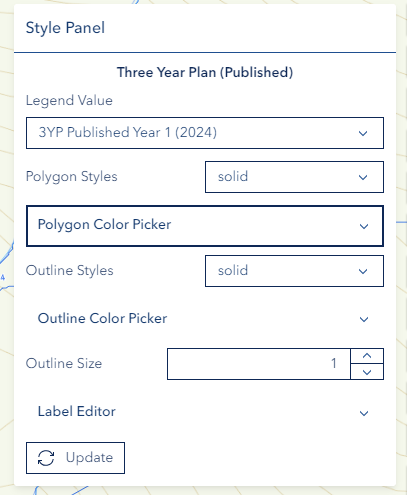
Layer Styling
Style Selection
- Choose Feature layer
- Verify layer visibility
- Access style options
Style Properties
- Style type selection
- Color configuration
- Fill color
- Outline color
- Size adjustment
- Transparency control
Applying Changes
- Adjust desired properties
- Preview changes
- Click 'Update'

Label Editing
Label Properties
- Font size
- Font weight
- Font style
- Text decorations
- Placement options
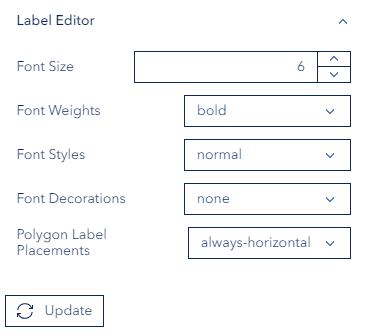
Placement Rules
- Polygon: always-horizontal
- Point/Line: multiple options
Troubleshooting
| Issue | Solution |
|---|---|
| Changes not visible | Check layer visibility |
| Style options unavailable | Verify layer type support |
| Label options missing | Confirm label data existence |