Appearance
View Selector
Table of Contents
Overview
The View Selector is an intelligent map configuration management system that provides rapid switching between predefined, purpose-built map views optimized for specific workflows and analytical tasks. This sophisticated tool integrates with Horizon's layer management system to deliver instant access to specialized layer combinations, automatic extent adjustments, and standardized configurations that enhance productivity and ensure consistent visualization standards across different forestry and GIS operations.
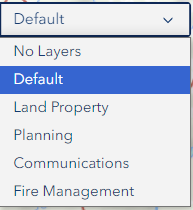
Using the Tool
Basic Operation
- Click View Selector dropdown
- Browse available views
- Select desired view
- Wait for view to load
View Loading
- Automatic layer configuration
- Map extent adjustment
- Layer visibility setting
Pre-Set Views
Available Views
- No Layers: Clear map view
- Default View: Roads, Drainage, Provcoupe, Land Tenure PTPTZ
- Land Property View: Property section layers
- Planning View: Planner-specific layers
- Communications View: Engagement section layers
- Fire Management View: Fire team layers
View Purposes
- Quick configuration access
- Standardized layer combinations
- Task-specific setups
Troubleshooting
| Issue | Solution |
|---|---|
| View not loading | Refresh page |
| Missing layers | Check permissions |
| Slow loading | Close other applications |
Best Practices
Efficient Usage
- Familiarize with pre-set views
- Use for quick switches
- Combine with Layer Panel
Organization
- Use clear view names
- Maintain logical grouping
- Regular view updates