Appearance
Add Layer Tool
Table of Contents
- Introduction
- Accessing the Add Layer Tool
- Using the Add Layer Tool
- Searching for Layers
- Adding Layers to the Map
- Managing Added Layers
- Tips and Best Practices
- Troubleshooting
- Video Tutorial
Introduction
The Add Layer Tool is a sophisticated layer discovery and integration system that provides seamless access to Horizon's comprehensive spatial data catalog. This intelligent tool enables users to search, preview, and integrate diverse geographic layers from multiple data sources, offering dynamic filtering capabilities, real-time layer integration, and intelligent categorization to enhance mapping projects with rich, contextually relevant spatial information for advanced visualization and analysis workflows.
Accessing the Add Layer Tool
- Locate the 'add' icon in the Horizon interface toolbar.
- Click the icon to launch the Add Layer panel.

Using the Add Layer Tool
Searching for Layers
- Within the Add Layer panel, utilize the search bar at the top.
- Enter keywords related to your desired layer.
- The panel dynamically filters results as you type.
- Results are displayed based on relevance to your search terms.
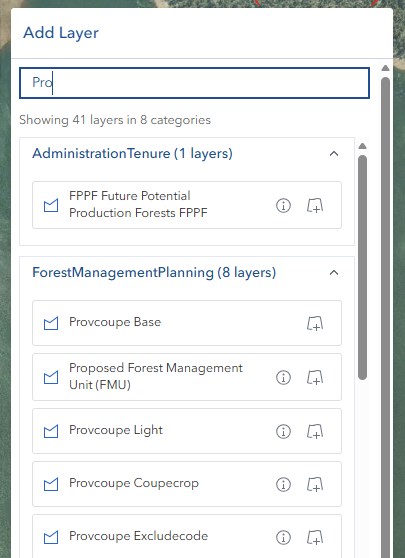
Adding Layers to the Map
- Review the filtered results in the Add Layer panel.
- Click on your desired layer to add it to the current map view.
- The selected layer will be automatically incorporated into your map visualization.
Managing Added Layers
- Access layer management through the Layer Panel
- Control features including:
- Layer visibility
- Transparency levels
- Layer ordering
- Style properties
Tips and Best Practices
Efficient Searching:
- Use specific keywords to quickly locate layers
- Try alternative terms if initial searches don't yield expected results
- Consider both full names and common abbreviations
Layer Organization:
- Add base layers first, followed by operational layers
- Group related layers together
- Remove unnecessary layers to maintain optimal performance
Performance Optimization:
- Add layers strategically to prevent performance issues
- Consider the geographic extent of layers
- Monitor system resources when working with multiple layers
Visual Hierarchy:
- Arrange layers to create clear, meaningful visualizations
- Use transparency to allow multiple layers to be visible simultaneously
- Consider the purpose of each layer in your map composition
Troubleshooting
| Issue | Solution |
|---|---|
| Layer not appearing after addition | Check layer visibility settings in the Layer Panel |
| Search not finding expected layers | Try alternative keywords or check layer availability |
| Performance issues with multiple layers | Remove unused layers or adjust layer properties |
| Layer loads but appears incorrectly | Verify layer compatibility and check zoom level requirements |
Video Tutorial
Watch this comprehensive guide on using the Add Layer Tool:
The Add Layer Tool is essential for creating detailed, informative maps in Horizon. By mastering this tool, users can:
- Efficiently incorporate diverse data sources
- Create rich, multi-layered visualizations
- Enhance the analytical capabilities of their maps
- Produce more comprehensive and informative geographic presentations
Understanding and effectively using the Add Layer Tool is fundamental to maximizing the potential of your Horizon mapping projects.