Appearance
Road Network Tool
Table of Contents
Overview
The Road Network Tool is an advanced routing and distance analysis feature in Horizon that provides comprehensive route calculations and network analysis capabilities. This specialized tool enables users to calculate precise distances from forest coupes to specific destinations, measure point-to-point distances across the road network, and visualize optimal routes for transportation planning and logistics optimization.
Tool Functions
Primary Functions
- Route Distance Calculations: Compute accurate road network distances between selected points
- Coupe-to-Destination Analysis: Calculate optimal routes from forest management areas to specified destinations
- Point-to-Point Measurements: Measure precise distances between any two points on the transportation network
- Route Visualization: Display calculated routes on the map with visual highlighting for easy interpretation
- Transportation Planning: Support logistics planning with accurate distance and route information
Available Tools
- Coupe Distance Calculator: Specialized tool for calculating distances from named forest coupes to destinations
- Network Distance Analysis: Comprehensive point-to-point distance measurements across the road network
- Route Optimization: Advanced routing algorithms for efficient path finding and transportation planning
Using the Tool
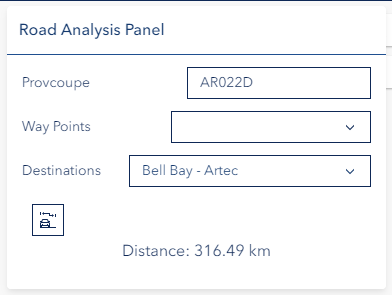
Coupe Distance Calculation
Enter Coupe Details:
- Type coupe name
- Select from matching options
- Choose destination
Calculate Route:
- Click calculate icon
- View highlighted route
- Review distance results
Troubleshooting
| Issue | Solution |
|---|---|
| Coupe not found | Verify name spelling |
| No route displayed | Check network connectivity |
| Unexpected route | Verify destination selection |
Video Tutorial
Watch this guide on using the Road Network Tool: