Appearance
My Layers Tool
Table of Contents
Overview
The My Layers Tool is a sophisticated personal data management system that enables users to create, store, and organize custom spatial datasets within Horizon. This powerful tool provides seamless integration with backend storage services, allowing users to build personalized collections of geographic features with full geometry support, automatic extent management, and intelligent layer categorization for enhanced spatial data organization and retrieval.
Layer Types
Comprehensive Geometry Support
- Point Geometries: Precise location marking with automatic coordinate capture and user-specific attribution
- Polyline Geometries: Route and linear feature mapping with multi-segment support and length calculations
- Polygon Geometries: Area definition and boundary mapping with automatic area calculation and spatial validation
- MultiPoint Geometries: Complex point collections for distributed feature representation and analysis
Advanced Features:
- Geometry Type Mapping: Intelligent routing to specialized layer services based on geometry type
- Automatic Projection: Seamless coordinate system handling and spatial reference management
- User Attribution: Automatic assignment of username and creation metadata for data ownership tracking
- Dynamic Layer URLs: Connects to appropriate backend services for each geometry type (Points, Lines, Polygons, MultiPoints)
Tool Operations
Creating Geometry
- Navigate to Map Editor Tool
- Select geometry type
- Draw on map
- Adjust if needed
Saving to MyLayer
Click "Save to MyLayer" option
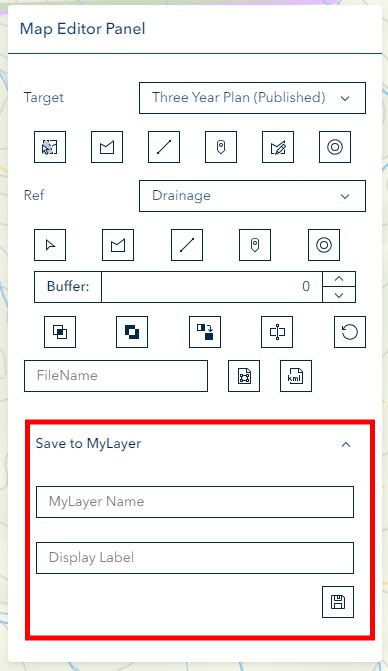
Enter Layer Details:
- LayerName for organization
- Optional label for identification
Accessing Layers
Click "MyLayer" button in left panel

View saved layers in MyLayer Panel
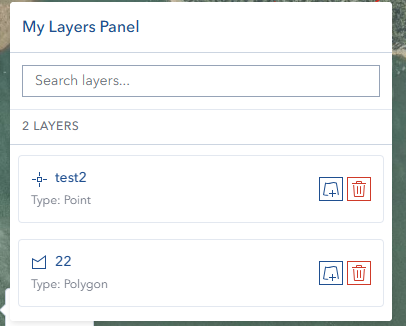
Managing Layers
- Select layers from panel
- Automatic zoom to layer extent
- Edit or update as needed
Important Notes
Technical Limitations
- Points created are single points, not multipoints
- Related to label display bug BUG-000131800
Troubleshooting
| Issue | Solution |
|---|---|
| Layer not visible | Click layer in MyLayer Panel |
| Save failure | Complete geometry before saving |
| Label display issues | Known limitation for points |
Video Tutorial
Watch this guide on using My Layers: