Appearance
AI Chat Assistant Tool (Beta)
Introduction
The AI Chat Assistant Tool is an advanced conversational feature in Horizon that provides intelligent assistance through two integrated modes. It combines Horizon AI for spatial analysis queries with Knowledge Search for information retrieval, offering context-aware responses and specialised GIS guidance to enhance your mapping workflow.
Key Features
- Dual Chat Modes: Switch between Horizon AI and Knowledge Search modes for different assistance types
- Conversation Management: Persistent chat sessions with conversation context and history
- Real-time Communication: Instant messaging interface with markdown support for rich formatting
- Spatial Query Execution: Execute multi-step spatial operations (buffer, intersect, query) directly from chat
- Map Integration: Direct integration with map layers and spatial data for context-aware assistance
- Layer Actions: View layer statistics, distinct values, and add suggested layers from responses
- Expandable Content: Collapsible sections for features, layers, and data analysis
- Paginated Results: Navigate through large result sets with pagination controls
- Auto-scroll Interface: Automatic message scrolling for improved user experience
Chat Modes
Horizon AI Mode
The primary mode for advanced spatial analysis and geospatial intelligence:
- Spatial Analysis: Execute complex spatial queries using TOON format definitions
- Multi-Step Operations: Chain operations such as get geometry, buffer, and query target
- Feature Results: View spatial query results with feature attributes and geometry highlighting on the map
- Layer Statistics: Request count, sum, average, min, and max statistics for layer fields
- Distinct Value Queries: Retrieve unique values from any field in a layer
- Conversation Context: Maintains conversation history and spatial context across messages
Knowledge Search Mode
A knowledge base search mode for information retrieval and documentation queries:
- Knowledge Base Access: Queries the Horizon knowledge base for GIS documentation and guidance
- Layer Data Queries: Search and analyse data within visible map layers
- Formatted Responses: Results displayed with formatted data tables and structured content
- Quick Answers: Fast responses for documentation, feature explanations, and how-to questions
Using the AI Assistant
Starting a Conversation
- Accessing the Tool:
- Locate the Chat Assistant icon in the Horizon interface
- Click to open the chat panel

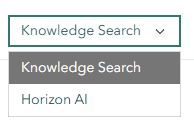
- Selecting a Mode:
- Use the mode dropdown at the top of the chat panel to switch between modes
- The icon and placeholder text change to reflect the active mode
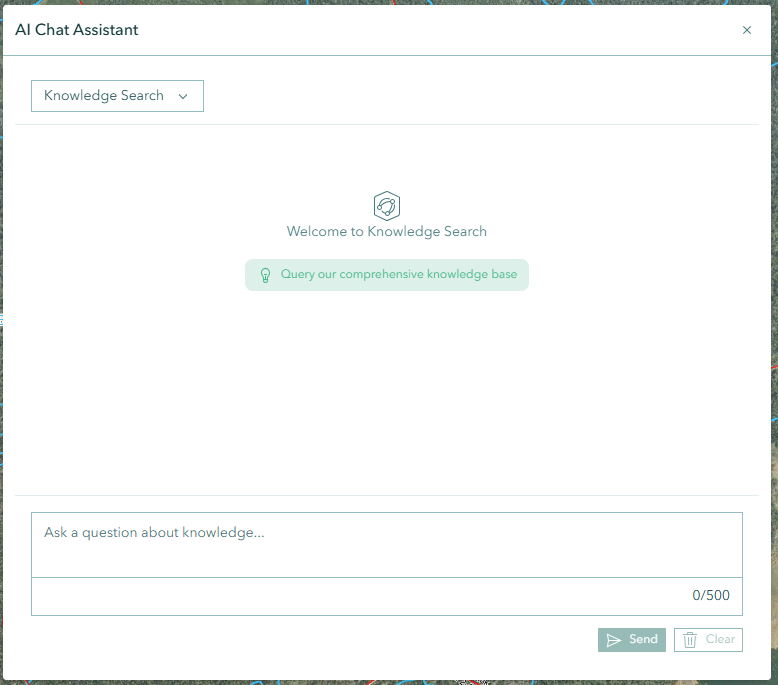
- A welcome message explains the capabilities of each mode
- Chat Interface:
- Type messages in the input field at the bottom
- Press Enter to send (Shift+Enter for new lines)
- Messages appear with timestamps for easy reference
- The Send button is disabled while a response is being generated
- Sending a new message automatically cancels any in-progress request
- Managing Conversations:
- Each session maintains conversation context and history
- Use the clear button to reset messages and start fresh
- Conversations automatically generate unique session IDs
Interacting with the Assistant
Asking Questions
- Use natural language to describe what you need
- Reference specific layers, tools, or map features
- Ask for explanations of GIS concepts or Horizon functionality
Spatial Queries (Horizon AI Mode)
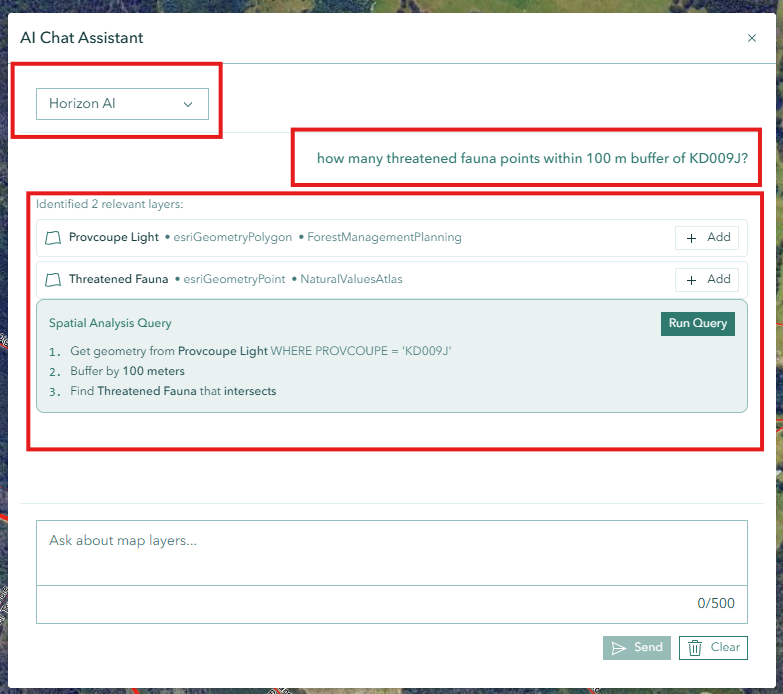
- Ask spatial analysis questions such as "How many parcels are within 500m buffer of Provcoupe XXXXX?"
- The assistant translates your question into spatial operations
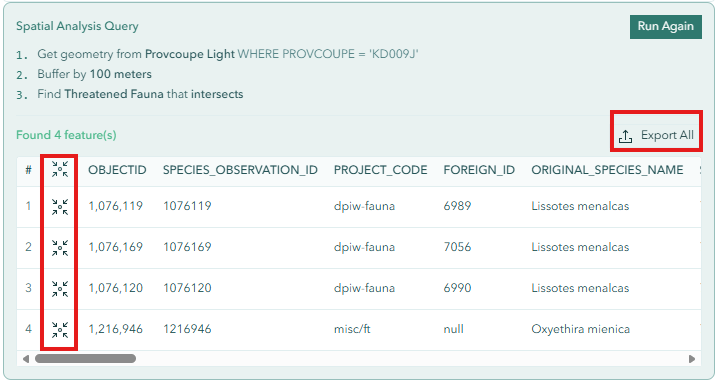
- Results include feature lists with attributes and map highlighting
- Use pagination controls to browse through large result sets (25 items per page)
Layer Actions from Responses
When the assistant references layers or data, interactive action buttons may appear:
- Layer Statistics: View count, sum, average, min, and max for a field
- Distinct Values: List all unique values in a specified field
- Add Layer: Add a suggested layer to your map directly from the response
Knowledge Search
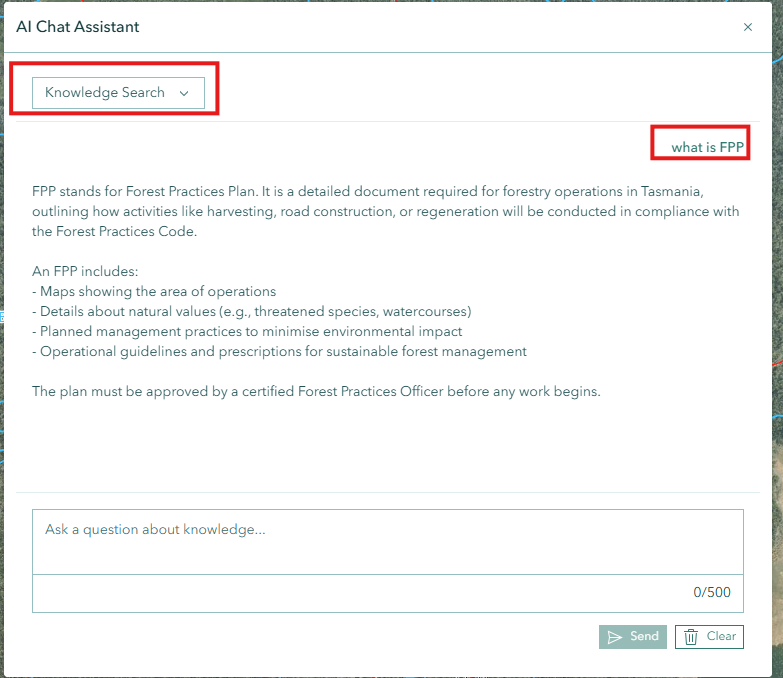
- Ask documentation or how-to questions about Horizon features
- Request information about GIS concepts or spatial data
- The assistant searches the knowledge base and returns formatted answers
Best Practices
Question Formulation:
- Be clear and specific in your queries
- Provide context when necessary (e.g., mention the layer name or area of interest)
- Break complex questions into smaller parts
Mode Selection:
- Use Horizon AI for spatial analysis, geometry operations, and layer queries
- Use Knowledge Search for documentation, feature explanations, and general questions
Effective Usage:
- Start with basic questions before complex ones
- Use the tool for documentation and feature inquiries
- Review spatial query results on the map for visual confirmation
Limitations
- Spatial queries depend on available layer data and server connectivity
- Complex multi-step operations may take longer to process
- Knowledge search results are based on the available knowledge base content
- Real-time data updates during a conversation session are not reflected automatically
Troubleshooting
| Issue | Solution |
|---|---|
| Unclear or irrelevant responses | Rephrase question with more specific details |
| No response received | Check network connection and refresh the tool |
| Incomplete information | Break down complex queries into smaller, focused questions |
| Spatial query returns no results | Verify the referenced layer is visible and contains data |
| Mode switch not working | Use the dropdown at the top of the panel to change modes |
The AI Assistant Tool serves as your intelligent guide through Horizon's features and capabilities, providing quick access to spatial analysis, information retrieval, and guidance when needed.